This website uses Javascript.
Please enable scripting in your Internet browser settings for full functionality.
Toggle navigation
Forms Online Login or Demo
Download Old Program (Ending 9/2024)
Product info
Features
Forms
Forms Online Demo/Login
Windows Desktop Demo/Download
Support
Product support
Contact
Store
Download for Windows Desktop
Download for Windows Desktop Program Only
Try before you buy: "Sample" prints on the forms until a License Access Code is entered.
Use for new installations and updates.
FAR Complete Forms for Windows Desktop
(Instructions)
*** Not needed for Forms Online ***
FAR Complete Forms for Windows Desktop
Includes FR/BAR and Florida REALTORS® forms.
Version 4.90.9 (current version)
Download AltastarFarCompleteCurrent
(Summary of Recent Form Changes)
Current FAR Complete subscribers for Windows desktop may install this file on licensed computers
without needing to reactivate.
.
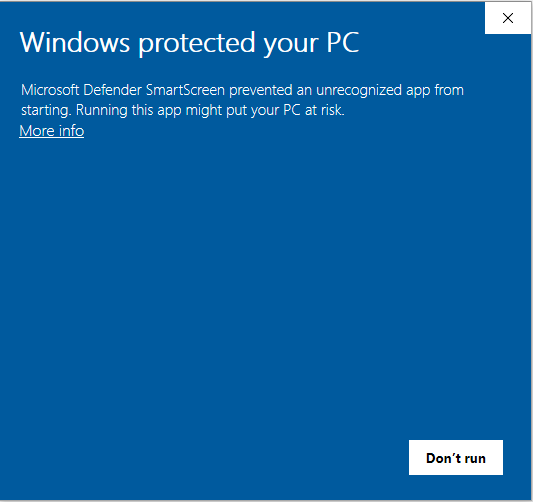
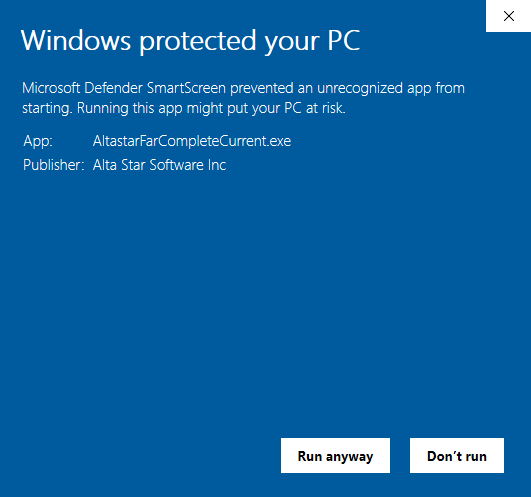
The download may be incorrectly flagged temporarily by Microsoft Defender Smart Screen as unrecognized or uncommonly downloaded. To unblock:
Use Google Chrome browser
When opening, at this message window:
Click "More info"
Next:
Click "Run anyway"
FAR/BAR Only Forms for Windows Desktop
Downloads for this product are FOR UPDATES of PRIOR INSTALLATION ONLY
FR/Bar forms are included in FAR Complete subscriptions.
c
To obtain the download to update an existing installation, you must first order and obtain a License Access Code. For info, email
[email protected]
.
Version 4.90 (current version)
(Summary of Recent Form Changes)
Instructions
Save the download on your computer and then open/run it. Accept the InstallShield prompts (recommended for most users).
Simply fill in the blanks and print your forms. For quick-start guide and info on time-saving features, browse through the program's Help menu.
Files that you have saved are not automatically deleted by software updates, new versions, reinstalls or uninstalls using these installation files.


 To obtain the download to update an existing installation, you must first order and obtain a License Access Code. For info, email